

Automate one clear workflow before adding more tools
Use these four checkpoints to choose, build and govern a reliable automation.
A practical system turns artificial intelligence from an expensive experiment into a silent operational engine. Most business owners who invest in new technology do not suffer from a lack of tools; they suffer from an absence of operational clarity. Buying another software subscription will never fix a broken workflow. Real leverage happens when you document a repetitive business process by hand, establish strict boundaries for quality, and deploy simple automation scripts or agent layers that remove friction from your team.
1. What Is AI Automation for Business (And Why Most Implementations Fail)?
AI automation for business is the structured integration of artificial intelligence models, webhooks, and rules-based logic into repeatable daily workflows to eliminate manual data entry, reduce response delays, and standardize client communication. Unlike standard software which only follows fixed if-then rules, artificial intelligence adds contextual language processing, document synthesis, and automated task routing to your existing operations.
AI projects often disappoint when the operating process is unclear, ownership is missing, or teams are asked to trust outputs they cannot inspect. The failure is usually less about the model and more about the workflow surrounding it.
Founders buy software tools based on promotional videos, hand them to untrained staff without standard operating procedures, and expect revenue to multiply automatically.
In my decade of hands-on agency operations, I witnessed this pattern repeatedly. When modern language models arrived on the market, founders across the service sector rushed to purchase every shiny subscription they could find. Some owners dismissed experienced technical staff members, believing that a single software prompt could instantly design websites, handle client disputes, and close sales calls without supervision.
The result of that premature rush was operational chaos. Client deliverables came back full of robotic phrasing, internal communication fragmented across half a dozen incompatible platforms, and owners found themselves working longer hours to fix mistakes made by unsupervised automated scripts.
Automation repeats whatever you give it, including confusion. If your intake process is disorganized on paper, connecting an artificial intelligence agent to your inbox will only produce automated disorganization at ten times the speed. Before you spend a single dollar on software, you must understand the underlying manual process from start to finish.
That is the same operating principle behind understanding why businesses fail to scale: capacity improves only when ownership and handoffs become clear.
2. The Great AI Tool Sprawl: Why Software Subscriptions Drain Your Margins
Software tool sprawl is the uncontrolled accumulation of isolated digital subscriptions across an organization, creating financial waste, security vulnerabilities, and operational friction between disconnected departments. The pattern appears when separate tools handle booking, customer records, proposals, transcription, project management, and AI tasks without a clear system of record.
Tool sprawl becomes expensive when subscriptions overlap, licenses are not reviewed, and important customer data must be copied between systems. The useful question is not how many applications a business owns, but which system is authoritative for each critical field and process.
The economic problem extends far beyond the direct monthly subscription price. When an agency adopts five different tools that do not share data cleanly, team members must manually transfer contact information, copy client briefs, and reformat project milestones between screens. This invisible manual tax destroys worker productivity.
Consider the reality of an unmanaged tool stack:
- The Marketing Tool: Generates an inquiry notification and drops it into a standalone email folder.
- The Calendar Tool: Requires the prospect to click an external link, often leading to drop-off.
- The Transcription Tool: Records a call but stores the transcript in an isolated cloud portal where the account manager never reads it.
- The Task Manager: Remains blank until an overworked project coordinator manually types tasks into a board hours later.
Repeated copy-and-paste work is a measurable operating cost. Practical business automation addresses it by removing unnecessary handoffs and routing data through a clear operational backbone.
If the financial effect is still unclear, use the evidence-led method in the guide to finding revenue leaks in a service business.
3. Four Core Workflows Service Companies Can Evaluate First
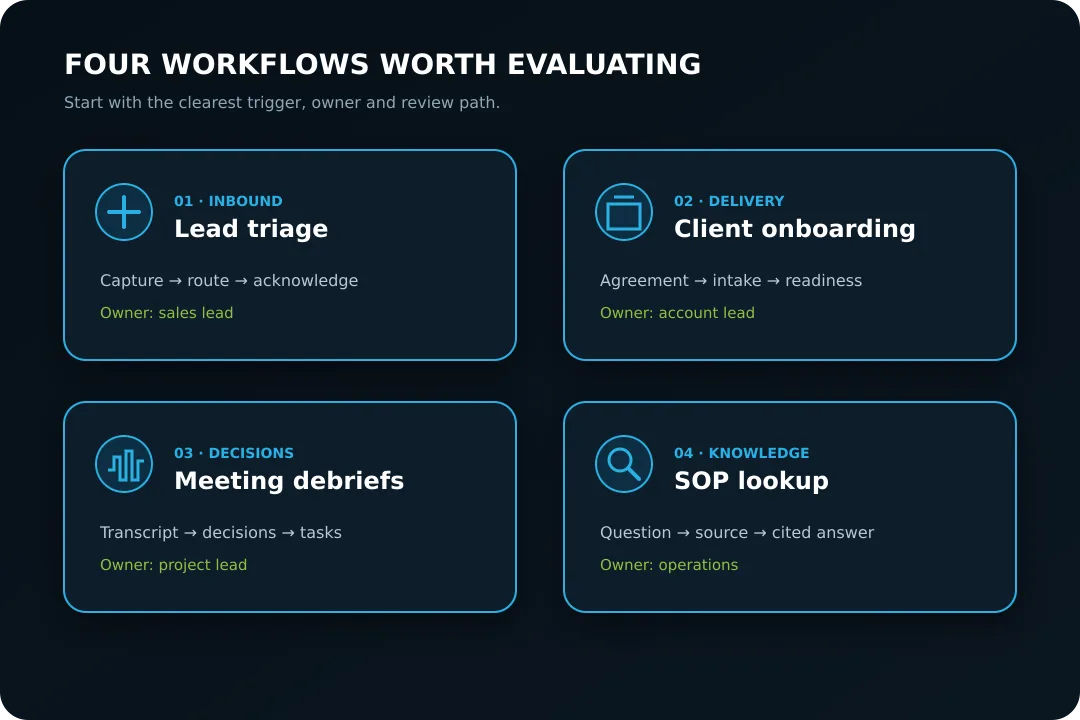
Four useful workflows to evaluate in many service businesses are inbound lead triage, client onboarding intake, meeting debrief extraction, and internal knowledge lookup. They are frequent sources of delay and duplicated administration, but the right starting point depends on evidence inside your own operation.
Use the four areas as a diagnostic shortlist, then begin with the workflow that has the clearest trigger, owner, and review path.
Workflow 1: Instant Inbound Lead Triage and Pre-Qualification
Inbound lead triage is the automated capture, qualification, and routing of prospective client inquiries the moment they arrive on your website or social channels. Historical research published by Harvard Business Review found that firms attempting to contact a lead within an hour were nearly seven times as likely to qualify it as firms waiting even one hour longer. The finding supports a narrow lesson: response ownership and timing matter; it does not mean an automated message guarantees a sale.
In a traditional manual service business, an inquiry sits in a general inbox for three hours until a manager notices it. The manager reads the email, forwards it to an account executive, and the executive replies with a generic question requesting more information. By the time that message arrives, the prospect has already contacted two competitors.
A practical automated workflow transforms this process completely:
- Intake: A prospect completes a structured four-field form on your website specifying their budget tier and primary operational bottleneck.
- Evaluation: A lightweight language model processes the submission against your qualification criteria, assigning an objective lead score.
- Conditional Action: If the prospect meets your criteria, the system sends an immediate confirmation email and presents a direct calendar booking link tied to the appropriate account lead.
- Internal Notification: The prospect details and initial operational diagnosis are sent to your internal team channel via webhook, giving the account executive complete context before the call begins.
A well-tested sequence can execute quickly, but the target should be based on your systems, risk level, and response policy. The founder never touches an email, no prospects slip through the cracks, and every qualified buyer receives immediate attention.
Workflow 2: Friction-Free Client Onboarding
Client onboarding is the initial handoff process where a newly signed customer submits project assets, grants account access, and receives their project schedule. Client retention begins with a clear first experience after agreement. A defined onboarding path reduces uncertainty for the client and prevents the delivery team from starting with missing inputs.
When onboarding is handled through chaotic email chains, clients become frustrated. They forget which assets they sent, team members wait days for login credentials, and the project start date slides backward.
A structured onboarding workflow solves this bottleneck:
- Step 1 (Payment Trigger): When the client signs their contract and submits payment through Stripe, a webhook fires instantly into your central operations platform.
- Step 2 (Workspace Creation): An automated sequence creates a dedicated client Google Drive folder, generates a project board in your task management system, and provisions a secure credential locker.
- Step 3 (Dynamic Form Delivery): The client receives a personalized welcome dashboard containing a single form that adapts based on their specific service tier. As they complete each field, assets are automatically organized into their Drive folder.
- Step 4 (Internal Kickoff Dispatch): Once all required fields are validated, the system alerts the designated account manager that the client file is complete and ready for production kickoff.
The client receives a clearer intake experience, while the team reduces repeated manual setup when the underlying process is stable.
Workflow 3: Meeting Debriefs and Task Delegation
Meeting debrief automation captures spoken client strategy sessions, extracts actionable commitments, and converts verbal promises into assigned project management tasks. Client calls create decisions, risks, and promises that are easy to lose when the next meeting begins immediately.
A practical debrief automation operates through three simple stages:
- Capture: A local or cloud recording tool captures audio with client consent and generates an exact timestamped transcript.
- Synthesis: A language model processes the raw transcript against a strict extraction prompt, separating casual pleasantries from concrete project deliverables. The model produces three distinct outputs: an executive summary for the client, an internal risk register, and a list of specific action items.
- Task Creation: Each action item is formatted with an assignee, a due date, and an acceptance criteria checklist, then pushed directly into your team task board.
Your team never debates who agreed to what deliverable, client scope creep is stopped before it starts, and consultants can concentrate fully on the conversation rather than scrambling to take manual notes.
Workflow 4: Internal Knowledge Retrieval and Standard Operating Procedure Lookup
Internal knowledge retrieval uses semantic search and document indexing to give team members instant answers to technical and operational questions without interrupting senior leaders. In growing agencies, founders can become human search engines, repeatedly answering questions about file naming, delivery standards, or system access.
Instead of interrupting managers, a centralized knowledge workflow indexes your written standard operating procedures:
- A team member asks a question in your internal operations chat: “What is our standard process for client sitemap submissions?”
- The system retrieves the exact excerpt from your approved documentation, cites the relevant guide, and provides a concise step-by-step answer.
- If the documentation does not contain an answer, the system flags the missing procedure to an operations manager so a new standard operating procedure can be written.
This approach creates an organization that learns continuously, preserves institutional memory, and allows founders to focus on strategic initiatives rather than repetitive internal questions.
4. Build a Lean AI Stack Around Three Operational Layers
A lean AI stack combines a central system of record, a workflow router, and carefully bounded model calls. The goal is not a universal price target; it is a stack whose cost, ownership, and failure paths can be understood.
Costs vary by provider, volume, data retention, messaging, storage, and support. Compare the total operating cost of each workflow using current vendor pricing and your own usage rather than a generic monthly benchmark.
The table below illustrates the contrast between a bloated enterprise software stack and a lean, owner-controlled automation architecture.
Automation Stack Evaluation Matrix
| Operational component | Fragile pattern | Lean pattern | Decision evidence |
|---|---|---|---|
| CRM and lead capture | Several disconnected records | One defined system of record | Duplicate records, response ownership, data completeness |
| Workflow automation | Hidden chains with no owner | Logged workflows with retries and alerts | Failure rate, recovery time, manual handoffs |
| AI processing | Model added to every step | Model used only for language or classification tasks | Accuracy sample, review requirement, cost per task |
| Meeting intelligence | Transcripts stored but unused | Decisions converted into reviewed tasks | Task acceptance, missing decisions, consent controls |
| SEO and data | Expensive seats without usage review | Source-backed tools tied to a clear operating need | Usage, freshness, decision value |
The Three Foundational Layers of a Lean Stack
To build a durable automation architecture, you only need three distinct operational layers:
-
Layer 1 (The Single Source of Truth): Maintain one defined database where customer data, communication history, and billing milestones reside. Platforms such as GoHighLevel or a suitable CRM can centralize forms, calendars, messages, and pipelines. A reliable system of record reduces conflicts between duplicate customer records.
-
Layer 2 (The Logic Router): A workflow engine such as Make.com or an internal webhook runner acts as your operational traffic controller. It listens for events (such as a form submission, an invoice payment, or a document upload) and routes that data according to explicit, deterministic business rules.
-
Layer 3 (The Intelligence Layer): When a task requires language synthesis, classification, or extraction, your logic router makes an on-demand API call to an advanced language model (such as Claude, GPT, or Gemini). Usage-based APIs can be economical for bounded tasks, but pricing and total cost should be verified against current provider terms and actual volume. Once the model returns the processed output, the logic router updates your central database and notifies the responsible team member.
This structure makes cost and reliability easier to monitor because every layer has a defined purpose and owner.
5. The Operating Protocol: Train Department Champions Instead of Firing Staff
The department champion protocol is an operational management strategy where business leaders identify one capable team member within each functional unit, teach them automation workflows personally, and empower them to supervise automated systems and train their colleagues. This strategy prevents the severe organizational disruption that occurs when founders attempt to replace loyal team members with untested software.
A critical mistake is viewing artificial intelligence as an excuse to remove human judgement before a workflow has been tested. Speculative headlines can make an unproven prompt look like a replacement for design, client communication, delivery management, or commercial accountability.
That approach can create serious operational trouble. Artificial intelligence models do not take accountability for client relationships or strategic recommendations. Without human oversight, incorrect assumptions can travel through a workflow before anyone notices.
The safer objective is augmentation: software handles repetitive preparation while a responsible person retains judgement, review, and accountability.
Choose a champion for each workflow rather than treating ownership as a vague team responsibility. That person should understand the process, test edge cases, review logs, maintain the fallback procedure, and teach colleagues how to inspect outputs.
Training champions also makes adoption easier because the system addresses a problem the team already recognizes and gives staff a clear route for reporting failures.
6. Move From Tool Activity to Operating Clarity
A lean transformation is measured by whether the business can deliver work with clearer ownership, fewer avoidable handoffs, and reliable evidence—not by how many tools or people it removes.
Start with one client journey and map what actually happens from inquiry to payment. Mark every place where information is copied, a decision waits for a person, or a team member must reconstruct context. Then choose the smallest change that removes recurring friction without weakening quality or client trust.
The practical sequence is:
- define the outcome and the human owner;
- document the current manual process;
- remove unnecessary steps and duplicate records;
- automate only stable rules;
- add review, alerts, and a manual fallback;
- measure whether the workflow improved.
This keeps automation tied to operating evidence instead of headcount theatre. The objective is calm, repeatable delivery—not a dashboard full of activity.
7. Five Critical Mistakes That Derail AI Implementation
The five most destructive mistakes service businesses make when implementing artificial intelligence are automating broken processes, failing to install human review gates, keeping client data in fragmented silos, overspending on black-box software tools, and failing to define clear operational ownership. Avoiding these five pitfalls protects your company from wasted capital and damaged client trust.
Mistake 1: Automating an Undocumented Process
Business owners frequently attempt to deploy an automated agent to solve a problem they have never solved manually. If your team cannot write down the exact criteria for qualifying a sales lead on a single sheet of paper, an artificial intelligence agent will not figure it out for you. Always execute a process manually until the pattern is stable, write the standard operating procedure, and only then automate the steps that never change.
Mistake 2: Removing the Human Review Gate
Allowing an automated model to publish content, send unvetted proposals, or email clients without human verification is an invitation to disaster. Language models can hallucinate facts, misinterpret nuance, or adopt an inappropriate tone. In our production workflows, artificial intelligence handles the heavy lifting of research, drafting, and data synthesis, but an experienced human specialist always conducts the final quality inspection before any deliverable reaches a client.
Mistake 3: Fragmenting Customer Data Across Multiple Silos
When you connect multiple independent software tools without a central database of record, customer information quickly becomes corrupted. One tool updates an email address, another tool maintains the old phone number, and a third tool fails to log an important client preference. Centralize your primary customer records in a single operations platform before connecting external automation scripts.
Mistake 4: Purchasing Overpriced Tool Wrappers
Some commercial tools are convenient interfaces over standard model APIs. That convenience may be worthwhile, but it should be evaluated against data handling, control, support, integration effort, and actual usage. Direct APIs can reduce unit cost in some workflows, while managed tools may reduce maintenance burden in others. Evaluate both options against the complete operating cost and risk.
Mistake 5: Failing to Assign Direct Operational Ownership
Software tools do not run businesses; people run businesses using tools. When an automation workflow breaks due to an expired API key, a changed form field, or a modified webhook payload, the failure often goes unnoticed for weeks if no specific team member is responsible for system health. Every automated workflow must have a single named operational owner who monitors execution logs, audits error rates, and ensures continuous performance.
8. The 30-Day Step-by-Step AI Implementation Roadmap
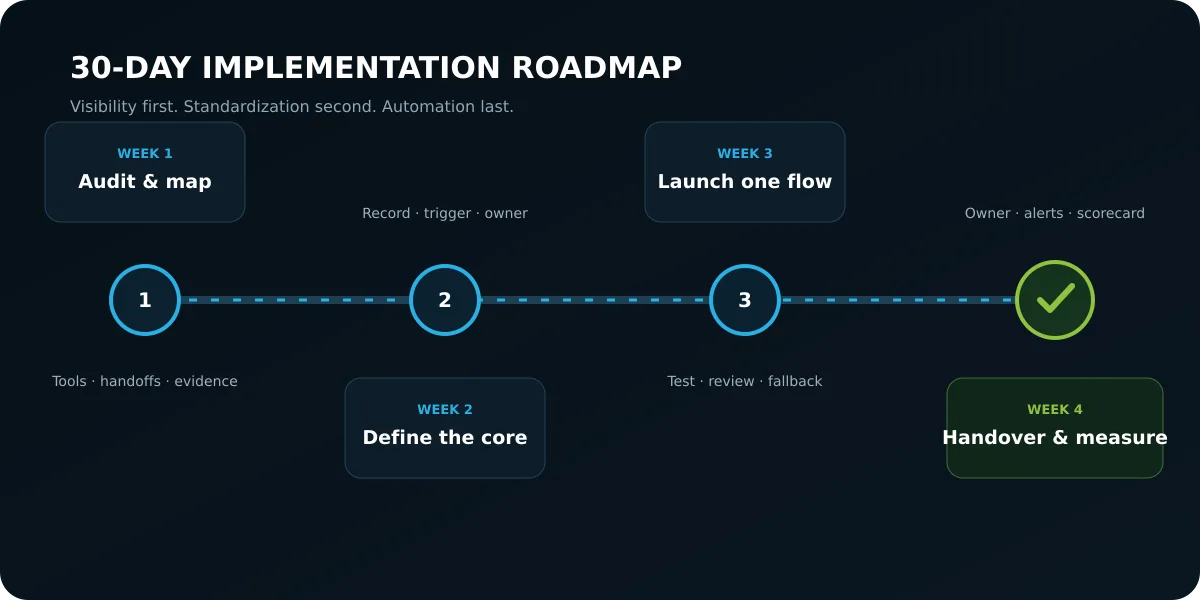
The 30-day AI implementation roadmap is a structured four-week deployment schedule that moves a service business from chaotic software sprawl to a lean, reliable automation foundation. Rather than attempting to overhaul an entire enterprise overnight, this phased approach delivers measurable operational wins every seven days.
Week 1: Audit and Tool Consolidation
- Day 1 to Day 3 (The Software Audit): Print your company credit card statements for the past 90 days. Highlight every recurring software subscription. Identify redundant tools, unused seat licenses, and forgotten trial accounts. Cancel inactive services immediately.
- Day 4 to Day 7 (Process Mapping): Choose your single biggest operational bottleneck (usually lead follow-up or client intake). Walk through the process with your delivery team. Document every step, decision point, and required asset on a single whiteboard or digital diagram.
Week 2: Establish Your Central Operational Core
- Day 8 to Day 10 (Platform Setup): Configure your central operations platform (such as GoHighLevel or your primary CRM). Import your clean customer list, establish your pipeline stages, and connect your business email and domain.
- Day 11 to Day 14 (Standardization): Replace scattered calendar links and third-party inquiry widgets with a unified booking calendar and intake form tied directly to your primary database.
Week 3: Deploy Your First Production Automation (Lead Triage)
- Day 15 to Day 18 (Workflow Construction): Build your automated lead response workflow. Connect your website form to an automated qualification webhook. Establish notification alerts to your internal team channel.
- Day 19 to Day 21 (Edge-Case Testing): Test the workflow with test submissions. Submit incomplete entries, high-budget corporate inquiries, and unqualified leads. Verify that the routing logic, email confirmations, and calendar bookings execute flawlessly in under ninety seconds.
Week 4: Expand to Client Onboarding and Train Your Champion
- Day 22 to Day 26 (Onboarding Automation): Build your automated client onboarding flow. Connect contract completion to workspace folder creation, dynamic intake forms, and initial project task dispatching.
- Day 27 to Day 30 (Champion Training): Walk through the live system with your designated department champion. Hand over operational monitoring, review checklists, and troubleshooting protocols. Document the workflow in your internal standard operating procedure library.
9. Shiny Tool Syndrome vs Practical Operational Automation
The distinction between shiny tool syndrome and practical operational automation lies in whether technology introduces ongoing distraction or creates durable operational capacity. Businesses suffering from tool syndrome continuously buy software without establishing processes; businesses practicing operational automation build systems that operate reliably in the background.
Use this operational comparison to evaluate your current technology investments:
| Evaluation Dimension | Shiny Tool Syndrome (Distraction) | Practical Operational Automation (Leverage) |
|---|---|---|
| Primary Motivation | Fear of missing out on industry hype | Solving a measurable operational bottleneck |
| Software Selection | Buying separate apps for every task | Centralizing workflows on a single core backbone |
| Monthly expense | Costs grow without usage review | Cost is measured per workflow and reviewed regularly |
| Implementation Approach | Handing tools to staff with zero training | Documenting the manual process before automating |
| Human Oversight | Expecting software to run unmonitored | Enforcing strict human review gates for quality |
| Maintenance Overhead | Constant troubleshooting across 10 apps | Clean webhook monitoring owned by one champion |
| Long-Term Outcome | Increased burnout, chaos, and lost margin | Higher profit margins, calm team, predictable scale |
10. Frequently Asked Questions (FAQ)
What is the most practical AI automation for a service business to start with?
A practical starting point is often inbound lead capture and routing because its trigger, owner, and expected next action can be defined clearly. Automate acknowledgement and routing first, then add qualification only when the criteria are explicit and reviewed.
Can a small service business implement AI automation without hiring software developers?
Some workflows can be implemented with visual automation tools, standard webhooks, and documented connectors. Sensitive data, financial actions, complex integrations, or high-volume systems may still require engineering and security review. Start with a bounded workflow and test its failure modes.
How much does it realistically cost to run an AI-automated service business per month?
There is no universal monthly budget. Cost depends on message volume, model usage, CRM seats, storage, integrations, monitoring, and support. Compare the verified cost of the manual workflow with the automated workflow at realistic volume, including maintenance and review time.
Will automating business workflows with AI make my client communication feel impersonal?
Automating routine business workflows makes client communication feel significantly more personal and attentive when designed correctly. Automation should never replace genuine human empathy or strategic consulting; it should eliminate the administrative friction that prevents your team from being present. When intake forms, document routing, and meeting debriefs are handled automatically, your account managers have the time and mental clarity to listen deeply to clients, respond thoughtfully to complex challenges, and deliver exceptional service.
How do I ensure my team adopts new AI automation workflows without resistance?
To ensure smooth adoption, involve team members directly in identifying daily operational friction, designate internal department champions, and establish clear policies that automation is designed to remove repetitive drudgery rather than replace human workers. When founders frame automation as an empowering operational tool, select eager team members to lead system testing, and provide adequate training on reviewing outputs, adoption becomes more likely because the system addresses a problem the team already recognizes.
What is the difference between simple rules-based automation and AI automation?
Rules-based automation follows rigid, predefined if-then logic where data must conform to an exact predetermined structure (such as copying a spreadsheet row when a specific form field is filled). Artificial intelligence automation introduces contextual understanding, natural language processing, and qualitative reasoning to the workflow. An artificial intelligence layer can summarize messy client call transcripts, categorize open-ended survey feedback, extract invoice line items from varied PDF layouts, and draft customized email replies based on client sentiment.
Turn One Workflow Into a Reliable Operating System
The goal is not to install AI everywhere. It is to choose one recurring source of friction, define the evidence and owner, and build a workflow the team can inspect and recover when something fails.
If you want an experienced second opinion before buying more tools, request a free 15-minute introduction. We can identify whether a focused next step exists without pretending that every process needs automation.
